Your Chairs Stay Full. The Front Desk Stays Covered.

Answer every booking call while the chairs are full, manage schedule changes, fill cancellations, and keep regulars rebooked.
24/7
Always Working
7
Days To Deploy
$0
Payroll Cost
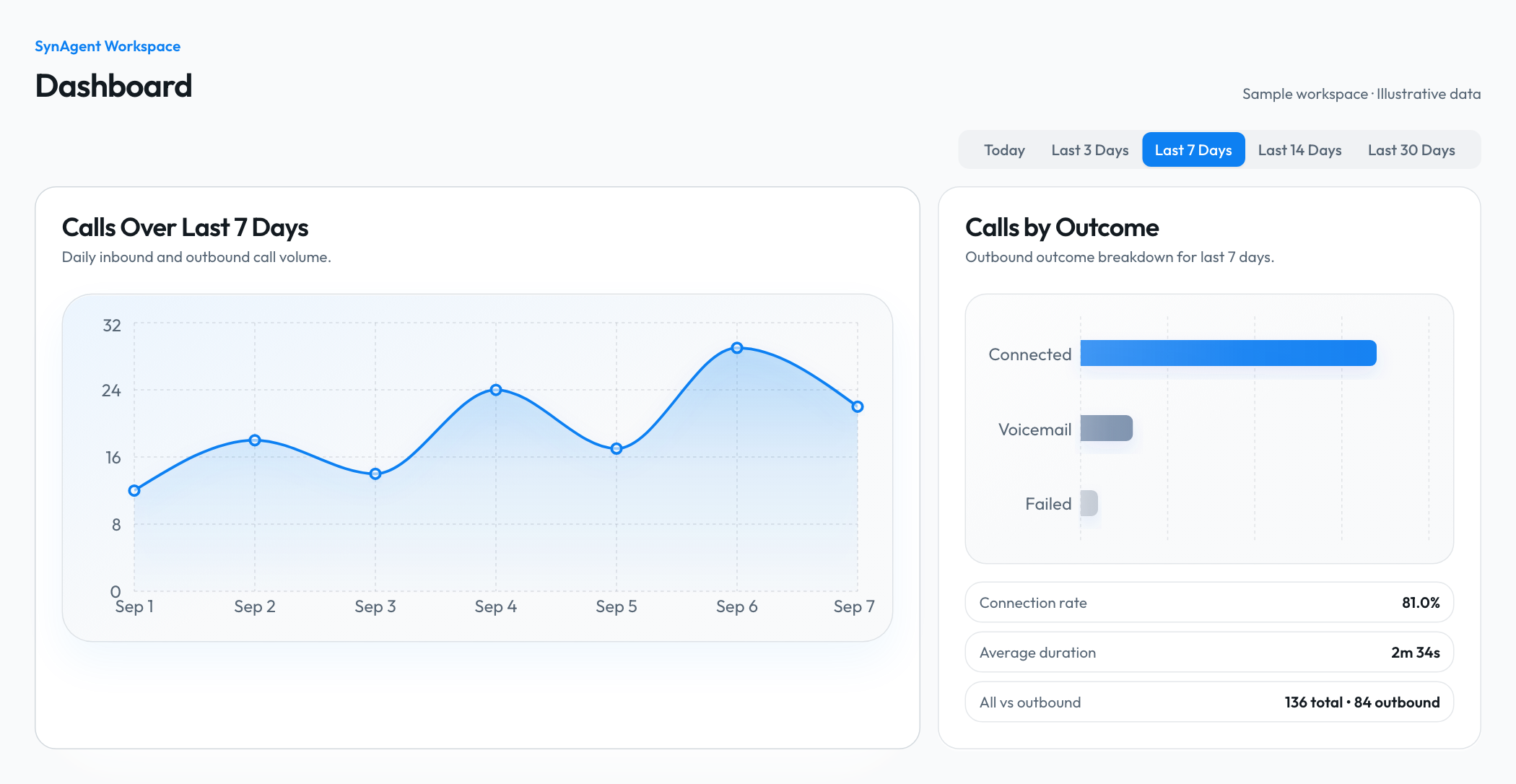
Inside your SynAgent workspace. Current dashboard shown with sample data.136 total calls, including 84 outbound calls. 68 connected, 12 reached voicemail, and 4 failed. Outbound connection rate: 81%.

Trusted by service-focused organizations

Customer logo 1
Customer logo 2
Customer logo 3
Customer logo 4
Customer logo 5
Customer logo 6
Customer logo 7
Customer logo 8

Live Industry Demo

Talk to Jamal, Your Digital Front Desk

Hear how Jamal answers calls while every chair is full, books and reschedules appointments, fills cancellations, and keeps regulars rebooked.

  • Books and reschedules
  • Fills cancellations
  • Keeps regulars rebooked

Salons, Spas & Barbershops

Meet Jamal.

Jamal is a demo. Your digital front desk works the same way, trained on your services, staff schedules, booking rules, and guest experience.

Jamal is your demo agent. Your version can have its own name and use your own voice, or another voice you choose.

Try asking

  • Can you book a haircut with my usual barber this Saturday?
  • I need to reschedule my colour appointment. What options can you offer?
  • A guest cancelled for this afternoon. How do you help fill the opening?
More things to ask
  • How do you answer calls when every stylist is with a client?
  • Can you remind a regular client that it is time to rebook?
  • What do you ask before booking a first-time spa or salon guest?

Done-for-you training.

We set up and train your agent on your business, scripts, and services, so it’s ready for its first day of work.

Live voice demo

Jamal · Salons, Spas & Barbershops

Idle

Your next call, answered.

Play the customer. Ask a question or try to book.

Microphone access required · Live conversation

A Front Desk That Stays Available

Booking support that keeps pace with a busy floor and a changing calendar.
SynAgent call coverage workflow graphic

Calls Answered While Every Chair Is Full

Jamal handles booking calls and routine questions while your team stays focused on the guests in front of them.

SynAgent scheduling and follow-up automation

Schedule Changes Handled In One Flow

Bookings, reschedules, reminders, and cancellation fills follow your actual services and calendar rules.
SynAgent guest record with appointment context

Guest Context Ready For The Team

Preferences, questions, booking notes, and follow-up outcomes stay connected to each guest record.

How Salons, Spas & Barbershops Put SynAgent to Work

Answer every booking call while the chairs are full, manage schedule changes, fill cancellations, and keep regulars rebooked.

Service & Provider Booking

Match each guest with the right service, duration, provider, and available appointment.

Availability checked

Booking confirmed in your calendar

Rescheduling & Cancellations

Move appointments, apply studio policies, and return suitable openings to the waitlist workflow.

From conversation to action

Conversation captured
Next action triggered
Contact updated

Waitlist Outreach

Contact guests who want an earlier visit when a matching time becomes available.

From conversation to action

Conversation captured
Next action triggered
Contact updated

Guest Rebooking

Invite regulars to schedule their next visit using the business's preferred timing and service history.

Conversation in progress

Details captured for your team

First-Visit Intake

Capture goals, preferences, timing, and approved consultation details before the guest arrives.

From conversation to action

Conversation captured
Next action triggered
Contact updated

Service & Policy Answers

Answer approved questions about preparation, pricing, hours, location, accessibility, and cancellation rules.

Conversation in progress

Details captured for your team

Illustrative workflows. Each employee follows your business rules and connected tools.

See What SynAgent Could Handle

Adjust your numbers to see what more answered calls could be worth.

What would you like help with?

Additional sales inquiries to handle per week
Your completed-sale rate
%
Revenue from one first sale
CAD

One purchase, before costs. Excludes repeat purchases and lifetime value.

Example inputs. Drag or type to match your business.

Your potential opportunity

Potential outcome

9additional customers

a month

Estimated additional revenue

CA$84,240a month

Potential revenue before costs, not profit or a guarantee.

How we got there

52 calls a month × 18% close rate × CA$9,000 per first sale.

Assumes these are additional, qualified sales inquiries that would otherwise go unanswered. Your close rate must reflect completed, paid visits or sales, including cancellations and no-shows. Calculations use unrounded figures; displayed counts are rounded.

Recommended monthly plan

Starter Receptionist

CA$149/mo

Covers up to 250 calls a month

Try the live demo
Your team covers 40 hours a week. See what 24/7 coverage adds.

Your team answerstoMon to Fri

Your team is available 40 hrs a week, 24% of the weekNot available for 128 hrsSynAgent is always available, all 168 hrs

Coverage compares availability. The value estimate above uses the call volume you enter.
Integration logo

Connect Your Booking And Guest Tools

Link Jamal to supported calendars, booking platforms, guest records, and follow-up workflows through available integrations and custom automation.

Build Your AI Workforce

Every role is purpose-built for your industry. Talk to us about which combination fits your operation — inbound, outbound, or both.

Inbound

Inbound

Digital Front Desk

Answers calls while stylists, barbers, and practitioners stay with their guests, then handles routine requests or routes anything that needs a team member.

  • Keeps service providers focused on the guest in their chair
  • Gives every caller a helpful next step

Automation: Identifies the caller's need, uses the studio's approved information, and logs the outcome in the guest workflow

Inbound

Appointment Booking & Rescheduling

Finds the right service, provider, duration, and available time, then books or reschedules according to the studio's calendar rules.

  • Matches guests with the right service and provider
  • Handles schedule changes without interrupting the floor

Automation: Checks connected availability, updates the appointment, and sends confirmation details

Inbound

Service Matching Concierge

Asks practical questions about the guest's goal, timing, preferences, and service history so the team receives useful context before the visit.

  • Collects useful context before a first visit or consultation
  • Keeps service guidance within the studio's approved scope

Automation: Captures consultation details, recommends only approved booking paths, and attaches notes to the appointment

Inbound

Guest Information Desk

Answers questions about services, pricing provided by the business, preparation, aftercare guidance, location, hours, accessibility, and cancellation policies.

  • Makes practical visit information available whenever guests call
  • Escalates questions that require professional judgment

Automation: Uses the business knowledge base for approved answers and routes personal care questions to staff when needed

Inbound

Digital Front Desk

Answers calls while stylists, barbers, and practitioners stay with their guests, then handles routine requests or routes anything that needs a team member.

  • Keeps service providers focused on the guest in their chair
  • Gives every caller a helpful next step

Automation: Identifies the caller's need, uses the studio's approved information, and logs the outcome in the guest workflow

Inbound

Appointment Booking & Rescheduling

Finds the right service, provider, duration, and available time, then books or reschedules according to the studio's calendar rules.

  • Matches guests with the right service and provider
  • Handles schedule changes without interrupting the floor

Automation: Checks connected availability, updates the appointment, and sends confirmation details

Inbound

Service Matching Concierge

Asks practical questions about the guest's goal, timing, preferences, and service history so the team receives useful context before the visit.

  • Collects useful context before a first visit or consultation
  • Keeps service guidance within the studio's approved scope

Automation: Captures consultation details, recommends only approved booking paths, and attaches notes to the appointment

Inbound

Guest Information Desk

Answers questions about services, pricing provided by the business, preparation, aftercare guidance, location, hours, accessibility, and cancellation policies.

  • Makes practical visit information available whenever guests call
  • Escalates questions that require professional judgment

Automation: Uses the business knowledge base for approved answers and routes personal care questions to staff when needed

Outbound

Outbound

Cancellation Fill Coordinator

Contacts guests who asked for an earlier time when a suitable opening appears, then books the first confirmed match according to studio rules.

  • Turns the waitlist into an active scheduling workflow
  • Keeps providers informed as the opening is filled

Automation: Matches cancellations to the waitlist, records responses, and updates the live calendar

Outbound

Regular Guest Rebooking

Reaches out when a regular guest is due to book again, using the business's preferred cadence and the guest's known service history.

  • Keeps recurring care from relying on memory or paper notes
  • Makes it easy for regulars to choose their next visit

Automation: Builds rebooking queues from completed appointments and writes the next booking back to the calendar

Outbound

Appointment Reminder & Recovery

Confirms upcoming visits, records reschedule requests, and follows up after missed appointments so the slot and guest relationship do not disappear from view.

  • Gives guests a direct path to confirm or change a visit
  • Keeps missed appointments in an organized recovery queue

Automation: Runs reminder and recovery workflows, then updates appointment status and follow-up tasks

Outbound

New Inquiry Follow-Up

Reconnects with guests who asked about a service but did not book, answers approved questions, and offers another chance to schedule.

  • Prevents interested callers from being lost after the first conversation
  • Keeps follow-up consistent across the front desk team

Automation: Tracks unbooked inquiries, runs the studio's follow-up cadence, and records booking intent

Outbound

Post-Visit Guest Care

Checks in after selected services, captures feedback, shares approved care reminders, and routes concerns to the appropriate team member.

  • Extends the guest experience beyond checkout
  • Makes service concerns visible to the right person

Automation: Starts service-specific follow-up, records guest feedback, and creates staff alerts for concerns

Outbound

Cancellation Fill Coordinator

Contacts guests who asked for an earlier time when a suitable opening appears, then books the first confirmed match according to studio rules.

  • Turns the waitlist into an active scheduling workflow
  • Keeps providers informed as the opening is filled

Automation: Matches cancellations to the waitlist, records responses, and updates the live calendar

Outbound

Regular Guest Rebooking

Reaches out when a regular guest is due to book again, using the business's preferred cadence and the guest's known service history.

  • Keeps recurring care from relying on memory or paper notes
  • Makes it easy for regulars to choose their next visit

Automation: Builds rebooking queues from completed appointments and writes the next booking back to the calendar

Outbound

Appointment Reminder & Recovery

Confirms upcoming visits, records reschedule requests, and follows up after missed appointments so the slot and guest relationship do not disappear from view.

  • Gives guests a direct path to confirm or change a visit
  • Keeps missed appointments in an organized recovery queue

Automation: Runs reminder and recovery workflows, then updates appointment status and follow-up tasks

Outbound

New Inquiry Follow-Up

Reconnects with guests who asked about a service but did not book, answers approved questions, and offers another chance to schedule.

  • Prevents interested callers from being lost after the first conversation
  • Keeps follow-up consistent across the front desk team

Automation: Tracks unbooked inquiries, runs the studio's follow-up cadence, and records booking intent

Outbound

Post-Visit Guest Care

Checks in after selected services, captures feedback, shares approved care reminders, and routes concerns to the appropriate team member.

  • Extends the guest experience beyond checkout
  • Makes service concerns visible to the right person

Automation: Starts service-specific follow-up, records guest feedback, and creates staff alerts for concerns

Need something custom?

The Difference

Not Just a Chatbot. A Trained Digital Employee That Works in Your Business.

Most AI tools wait to be asked. SynAgent digital employees show up, take action, and keep your business moving around the clock.

Book me an appointment

Typical AI Tool

Generic Chatbot

Hi! How can I help you today?

Sure! Please visit our website or call us to schedule.

Waiting for the next prompt

The customer takes it from here.

0 Calls Made

0 Bookings

0 CRM Updates

SynAgent Employee

Alex · Digital Sales Rep

On Shift
  1. Appointment booked

    Tuesday at 2:00 pm · Calendar updated

  2. Confirmation sent

    Appointment details delivered to the customer

  3. Contact updated

    Conversation and booking saved to your CRM

Your team gets the completed work.

The details stay in the tools you already use.

34 Calls Today

11 Bookings

58 CRM Updates

Illustrative workflow. Your employee follows your booking rules and connected tools.

How It Works

You Hire.
We Build.
They Work.

01

You Define the Role

Tell us the job: receptionist, sales qualifier, appointment setter, follow-up specialist. You decide what your business needs.

02

We Build and Train Them

Our team trains the employee on your services, tone, scripts, and workflows. They learn your business like a new hire — before their first day.

03

They Deploy Into SynAgent

Your employee gets a workplace inside SynAgent. From here they answer calls, book meetings, update your CRM, and run workflows — all logged and visible to you.

04

You Manage. They Grow.

Add skills, adjust scripts, expand responsibilities. Unlike real employees, your digital worker improves instantly. You never retrain from scratch.

SynAgent Workspace

2 active agents

Alex

Receptionist

On a call

4:12

Answering and qualifying the caller

Syla

Follow-up specialist

Sending reminders
3 queued

From conversation to completed work

Call answered
Visit booked
CRM updated

Illustrative workspace. Your agents follow your business workflows.

SynAgent Insights

Keep answers as current as your services.

Hear what makes customers hesitate, what frustrates them, and what they want to know. Turn those conversations into clearer answers and stronger sales conversations.

Hear what keeps coming up.

See recurring questions about appointments, treatments, and pricing. Review responses and update your employee with the details guests need before booking.

From real voice conversations

Recurring questions might include

Appointment availability

Services and cancellation policies

Illustrated workflow · Included with every plan

Discover the patterns. Add the knowledge. Keep getting better.

Why SynAgent

We Build Your Digital Workforce.

Most AI platforms hand you tools and walk away. We design each role, train your digital employees on your business, test every workflow, and deploy them ready to work on day one.

They stay. They grow. And when your business changes, you upgrade your employees, not your subscription.

Typical AI Tool
SynAgent
Core
What You Get
A chatbot
A trained employee
Setup & Support
You
Our team
Payroll Cost
Tool fee only
$0 per month
Communication
Phone Number
Not included
Included per agent
Web Embed
Not included
Included
Calendar Integration
Not included
Included
Calling
Bulk Calling
Not included
Included
Call Audio
Not included
Included
Call Transcripts
Not included
Included
Platform
CRM
Manual / separate
Built into platform
Can Be Retrained
Start over
Update anytime
Core
What You Get
A chatbot
A trained employee
Setup & Support
You
Our team
Payroll Cost
Tool fee only
$0 per month
Communication
Phone Number
Not included
Included per agent
Web Embed
Not included
Included
Calendar Integration
Not included
Included
Calling
Bulk Calling
Not included
Included
Call Audio
Not included
Included
Call Transcripts
Not included
Included
Platform
CRM
Manual / separate
Built into platform
Can Be Retrained
Start over
Update anytime
Core
What You Get
A chatbot
A trained employee
Setup & Support
You
Our team
Payroll Cost
Tool fee only
$0 per month
Communication
Phone Number
Not included
Included per agent
Web Embed
Not included
Included
Calendar Integration
Not included
Included
Calling
Bulk Calling
Not included
Included
Call Audio
Not included
Included
Call Transcripts
Not included
Included
Platform
CRM
Manual / separate
Built into platform
Can Be Retrained
Start over
Update anytime

The Real Math

What hiring actually costs you

We start at a real market rate — not the legal floor. Slide up to match the role you'd actually hire for. Watch the gap grow.

Detecting your location…

One Human Employee

40 hrs/week · minimum wage floor

Annual Wage Cost (CAD)

CA$0

  • · CA$22.00/hr × 40 hrs × 52 weeks
  • · Benefits & payroll taxes not included (add 25–40%)
  • · One person — one task at a time
  • · Can quit, get sick, or need time off

Your Digital Employee

Built once — works forever

Year One Total

CA$1,887

  • · CA$99 one-time build & training fee
  • · CA$149/mo workspace — phone, memory, CRM, calls

250

min/mo

1 local number

What you'd actually pay

CA$22.00/hr
Min: CA$17.20/hrCA$75/hr

Break-even

Pays for itself in under a week.

Of what you'd otherwise pay one human at CA$22.00/hr.

You Save

CA$0

in year one alone.

Build My Digital Team

Minimum wage data reflects current legislation in your region. Actual employment costs including benefits and payroll taxes are typically 25–40% higher. SynAgent pricing is converted into local currency here for comparison only.

PRICING

Choose Your AI Employee Plan

We build, train, and deploy your AI Voice Employee. Your monthly plan starts after you are satisfied at launch.

Prices in CAD. Setup is a one-time fee.

7-Day Deployment Promise + 30-Day Build Guarantee

If your AI employee is not doing the job within 30 days of going live, we keep tuning the scripts, call flow, and automations until it is.

Starter Receptionist

Replaces a part-time receptionist.

Stop missing calls. Capture every lead, 24/7.

1 inbound employee

One-time build

$99

Then$149/month

Starts when you approve launch.

Best for:Solo operators, contractors, and 1-5 person teams that need reliable call coverage.

What's included

  • 250 voice minutes included
  • 100 contact capacity inside the CRM
  • Inbound call answering
  • Local number, call page, and website widget
  • Call summaries, transcripts, and lead capture
  • 25 SMS messages included per month
  • SynAgent Insights: call trends and knowledge updates
  • Included support: 30 minutes of script and workflow updates each month, with a 72-hour response promise.
30-day build guarantee
Most Popular

Growth Voice Team

Replaces a full-time receptionist + lead follow-up assistant.

Answer every call. Follow up on every lead. Automatically.

Inbound+Outbound2 employees

One-time build

$299

Then$349/month

Starts when you approve launch.

Best for:For growing businesses that need to capture calls and follow up on leads automatically.

What's included

  • 1,100 voice minutes included
  • Add up to 500 contacts to one outbound calling batch
  • 1,500 contacts capacity inside the CRM
  • Inbound and outbound coverage
  • 2 local numbers, call pages, and website widgets
  • Booking, lead qualification, reminders, CRM updates
  • Email/SMS workflows
  • 100 SMS messages included per month
  • SynAgent Insights: call trends and knowledge updates
  • Included support: 90 minutes of script and workflow updates each month, with a 72-hour response promise.
30-day build guarantee

Operations Voice Team

Replaces a 2–3 person front-desk team.

A full voice operations team. Multiple lines, multiple campaigns, zero hiring.

Inbound or outboundup to 4

One-time build

$799

Then$849/month

Starts when you approve launch.

Best for:For higher-volume teams running multiple campaigns, locations, or service lines.

What's included

  • 3,500 voice minutes included
  • Add up to 1,000 contacts to one outbound calling batch
  • 10,000 contacts capacity inside the CRM
  • Up to 4 AI voice employees
  • Up to 4 local numbers, call pages, and widgets
  • Routing, campaigns, customer service, booking, reminders
  • Advanced workflow automations and reporting
  • 250 SMS messages included per month
  • SynAgent Insights: call trends and knowledge updates
  • Included support: 2 hours of script and workflow updates each month, with a 48-hour priority queue.
30-day build guarantee

For Teams That Scale

Business Workforce

Custom AI voice workforce for multi-location operators, franchises, clinics, dealerships, and call-heavy teams with complex routing or reporting needs.

10,000+ voice minutes
Custom employees and routing
Custom workflows and integrations
Dedicated optimization
SynAgent Insights: call trends and knowledge updates

$1,999/mo

$2,500 employee training and onboarding

+ applicable taxes

Real user feedback

What users have to say.

Conversations that make a difference.

Omega Communications

Danielle Osei

Head of Client Services

Intake was the bottleneck. Prospects would reach out and just sit in a queue waiting to hear back. SynAgent handles that first conversation now. By the time it gets to us, they're already qualified.

What the agent handled

  • Instant intake
  • Qualified handoff
  • Client-ready leads
1 / 2

Questions, answered.

What people actually want to know before they hire a digital employee.

Put Jamal At Your Front Desk

Build a digital front desk around your services, team calendars, policies, and guest experience.

Always-On Call Coverage
CRM Updates
Natural Voice AI
Follow-Up Workflows
Appointment Booking
Conversation History
Flexible Capacity